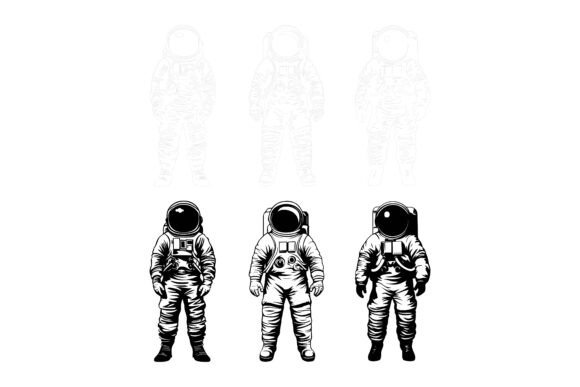
Astronauts Vector Bundle: AI & EPS Space Illustration Set
When you first open a well-organized vector file, the difference is immediate. Instead of hunting through meaningless layers or wrestling with messy shapes, you can focus on what sparked your interest in the first place—the artwork itself. The Astronauts Vector Bundle delivers exactly that kind of thoughtful structure. It’s a compilation of astronaut-themed illustrations delivered in Adobe Illustrator (AI) and EPS formats, plus high-resolution JPG previews, all built with a clean, consistent visual language and a file organization that respects your time.
Why Presentation-Ready Vector Art Matters Across Audiences
Not everyone looks at a space-themed graphic collection through the same lens. A freelance graphic designer might scan for scalability and how easily they can repurpose a single suit design into a dozen unique icons. An educator preparing a STEM unit could care more about crisp line work that stays sharp on a projector slide and a printed handout. A small business owner creating their own product labels might prioritize the ability to apply brand colors in one click without distorting details. The bundle was assembled with these differing priorities in mind.
What ties those needs together is the underlying quality of the files. The download is made to run natively on both Mac and Windows systems, so there’s no platform friction. Inside, you’ll find neatly organized files with clearly named groups and layers, which makes edits intuitive even if you’re relatively new to vector software. Because each illustration shares the same stylistic DNA—consistent stroke weights, balanced proportions, and honest attention to detail—your final project looks cohesive whether you use one graphic or ten.
What’s Inside the Download
The collection arrives with a mix of practical assets designed for immediate use and long-term adaptability:
- AI and EPS vector files – fully scalable and editable in popular design tools such as Adobe Illustrator, Affinity Designer, CorelDRAW, or free software like Inkscape.
- JPG previews – let you quickly scan the artwork without launching vector software, perfect for tossing a placeholder into a presentation or web mockup.
- Layer-based structure – every element is named and grouped so you can isolate, recolor, or remove parts faster than you’d expect.
- Perfection in details and consistency – no rogue anchor points or mismatched styling; the illustrations maintain visual harmony from file to file.
- Print and digital readiness – because vectors are resolution-independent, the same graphic works beautifully on a business card, a website hero banner, an infographic, or a mobile app icon.
Educators and Science Communicators
When you’re building a lesson around space exploration or physics, a generic clipart search rarely cuts it. With editable astronaut vectors, you can adapt poses, highlight specific equipment, or color-code suits to illustrate concepts. A middle-school science teacher might create a reward badge system by modifying one astronaut icon several times, while a science museum educator could print enlarged versions for an interactive wall display. The organized layers mean that someone who’s comfortable but not expert in design tools can still make precise changes in minutes.
Small Business Owners and Marketers
If your brand touches on adventure, technology, or childhood imagination, space-theming can reinforce your message without feeling forced. Using the bundle, a coffee roaster might place a tiny astronaut beside a bag of “cosmic blend” on their website. A kid’s apparel shop might pull line-art versions for hang tags. Because the files are yours to edit, you can swap colors to match your palette on every single graphic—no recurring licensing worries. The inclusion of JPG previews also speeds up the selection process when you need to quickly mock up a promotional post or newsletter graphic.
Bloggers and Content Creators
Original images break up text and make posts more shareable. Whether you run a tech blog, a parenting site, or a creative studio blog, space-themed visuals can symbolize forward momentum, curiosity, or discovery. Instead of using the same stock images others rely on, you can tailor the astronauts to your personal brand by adjusting hues or adding simple custom elements. The vector format ensures your header images never get that fuzzy, stretched look when shared on different social platforms.
App Developers and UI Designers
Astronaut figures and cosmic elements often show up in meditation apps, habit trackers, educational games, or onboarding screens for tech products. Vector originals let you export crisp icon sheets at any required density without rework. The well-structured layers also lend themselves to micro-interactions—imagine isolating an astronaut’s arm to animate a waving motion in a prototyping tool. A developer working on a space-themed to-do app might recolor a set of astronauts to indicate task priority levels, all while retaining visual unity.
Hobbyists and DIY Makers
From custom T-shirt designs to sticker sheets and scrapbooking, vector artwork streamlines the creative process. If you use a cutting machine, clear line art translates into smooth cut paths. Someone planning a space-themed birthday party could produce coordinated invitations, cupcake toppers, and favor tags from the same base illustrations. Because the files are editable, you can scale up a design for a banner without fear of pixelation, then scale it right back down for a small thank-you note.
What Makes a Vector Bundle Worth Returning To
Beyond the novelty of a theme, long-term satisfaction often depends on the less flashy factors. A freelancer asked to build a client presentation at 10 p.m. cares most about reliability—will the file open without errors, and can they find the element they need without clicking through dozens of unnamed layers? The Astronauts Vector Bundle is intentionally structured so that technical stress doesn’t eat into creative time.
Beginners often discover that exploring a professionally built file is one of the fastest ways to learn vector editing. By hiding and revealing layers, ungrouping objects, and studying how details are nested, you pick up organizational habits that improve your own future work. Users with more experience will appreciate the crisp execution—the consistent use of closed paths, smooth curves, and deliberate spacing that makes recoloring or resizing trouble-free.
Cost predictability also appeals to bootstrapped ventures. You pay once for a collection you can use across unlimited projects, months or years down the line. An educator might pull the same astronaut illustration out each semester for a new generation of students, recoloring it to match a revised curriculum theme each time. A marketing freelancer could weave the graphics into multiple client deliverables without worrying about per-use licensing fees.
Is This Set the Right Match for Your Project?
Deciding whether to bring an illustration bundle into your toolkit often comes down to a few practical self-checks:
- Do you need to frequently change colors, sizes, or compositing of space-themed artwork? The vector base and organized layers make that second nature.
- Will your visuals be used across both screen and print? Vectors remove resolution anxiety entirely.
- Does your brand or message rely on visual consistency over time? A matching style across all assets signals professionalism even when you’re assembling materials quickly.
- Is your time more valuable than the effort of crafting every astronaut icon from zero? A ready-to-edit bundle often repays its cost the first time you avoid a late-night drawing session.
Beginners might worry about editing complexity, but the learning curve here is gentle. Start with a simple recolor: open an AI file, select a space suit, and use the color picker to align with your brand. That single adjustment can transform how the graphic feels. More advanced users can merge elements from different files, build new compositions, and export production-ready assets without having to clean up node clutter first.
Adapting the Graphics to Your Tools and Workflow
Because the bundle ships with AI, EPS, and JPG formats, you aren’t locked into a single software ecosystem. Mac or Windows, Adobe suite or open-source editor, print house or web framework—the files travel well. The EPS format widens compatibility with older design software and some CNC programs, while AI retains full editability with layers intact. JPGs can be dropped directly into email drafts, Canva layouts, or social media schedulers when you need speed over editability.
If you’re building an infographic, you can pick a set of astronaut poses, recolor them according to data categories, and assemble a visual story that feels bespoke. An e-learning developer might craft a space-themed module where a helpful astronaut character guides users through lessons, with overlays and speech bubbles added as separate layers. Because the native files are layered and organized, adding your own elements doesn’t require deconstructing someone else’s messy work first.
Whether you’re designing a new app symbol, freshening up a blog, enriching a classroom, or prototyping a product label, the bundle aims to be one of those quiet workhorses that removes friction rather than adding it. When you’re ready to give your projects that polished, exploratory feel, you can download the collection and see how much faster a well-built vector set lets you turn an idea into something tangible.