Camera Polaroid Icons for Versatile Visual Projects
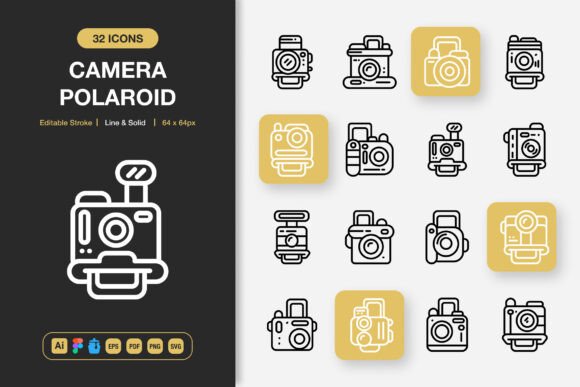
Finding icon sets that feel both nostalgic and modern can be difficult. The Camera Polaroid Icons collection fills that gap. It offers a carefully crafted bundle of high-quality illustrations centered around instant photography, vintage cameras, and the unmistakable Polaroid frame. More than just retro decoration, these icons work across digital and print media, giving visual storytellers a quick way to add warmth and authenticity. The files arrive in multiple formats—Adobe Illustrator, Figma, Iconjar, EPS, PDF, SVG, and PNG with transparency—so you can drag them straight into a website mockup, a social media graphic, or a printed flyer. Both line and solid styles are included, and every path is fully editable. This means you can quickly adjust thickness, change colors, or simplify details without starting from scratch.
Because different creators have different needs, this icon set tries to speak to a wide range of project types and skill levels. Someone new to design can drop a ready-made SVG into a blog header and immediately lift the visual tone. A seasoned brand designer can open the Adobe Illustrator source file and reshape every anchor point until the icon aligns perfectly with an established identity. By understanding how and why people will use these camera polaroid graphics, you can decide if they fit into your own workflow—whether you are building an app, teaching a workshop, or printing invitations for a local event.
What Makes Camera Polaroid Icons Different
At first glance, an icon pack seems straightforward. You download it, unzip it, and drop images into place. But under the surface, quality, scalability, and editability determine whether you will use the set once or return to it for years. The Camera Polaroid Icons collection focuses on clean, minimalist design that does not lean too trendy or too outdated. The subject matter—Polaroid cameras, instant film frames, flash units, selfie gestures—remains instantly recognizable, which helps users communicate ideas faster. The strokes are consistent, the proportions feel balanced, and the solid versions read clearly even at very small sizes, such as favicon dimensions or app toolbar icons.
One feature that invites repeat use is the 100% customizable structure. Because the source files are vector-based and fully editable, you are not locked into a single color palette or stroke width. A blogger might keep the warm orange and cream tones for a vintage travel diary. A UX designer for a photo-sharing app might recolor everything to a monochrome palette and thin the lines to match a minimalist interface. A teacher assembling printable flashcards could scale the icons up without any pixelation and keep them in black and white to save ink. That flexibility transforms a simple icon set into a building block for very different storytelling needs.
Web and App Designers Seeking Clarity and Speed
Digital product designers often work under tight iteration cycles. Hunting through scattered free icons, adjusting mismatched styles, and then worrying about commercial licenses eats up time. A unified set like Camera Polaroid Icons removes those friction points. All icons already share the same visual language, so pairing a camera icon with a photo frame and a flash symbol feels natural. The Figma file means you can open the library directly inside your design tool, drag symbols onto artboards, and immediately see how they sit within a layout. Because the strokes are editable, you can refine weight for dark mode or light mode without leaving your primary workspace.
For an app focused on photo prints or memory sharing, these icons offer more personality than generic system icons. A solid-style instant camera as a tab bar icon immediately sets the right mood. A line-style Polaroid frame can serve as a placeholder for user galleries. When small details like rounded corners and overlapping layers survive at 24×24 pixels, the interface feels more thoughtful. Both beginners building their first portfolio project and experienced designers updating a live product will notice the difference.
Marketers and Content Creators Who Need Fast, Engaging Visuals
Marketers, social media managers, and content creators rarely have the luxury of illustrating everything from scratch. They need assets that look professional, align with current aesthetics, and download quickly. The Camera Polaroid Icons set provides PNG files with transparent backgrounds, making it easy to layer icons over photographs, video thumbnails, or Instagram story backgrounds. Because the style stays minimalist, the icons do not compete with product images or headlines—they support them.
Imagine a small business promoting a flash sale on photo prints. A simple solid Polaroid icon next to the discount code instantly communicates the promotion category. An email newsletter about a photo contest could use line-style camera icons as section dividers. Infographics comparing different instant film formats benefit from simplified visual references that keep the information from feeling cluttered. The SVG format also keeps file sizes tiny, so loading times on web pages and mobile emails stay fast, which matters for SEO and user retention.
Print and Editorial Designers Working Across Formats
When layouts need to transition from screen to paper, resolution and color accuracy become critical. The EPS and PDF formats inside this collection preserve vector sharpness no matter how large you scale the artwork. A designer creating a poster for a photography exhibition can enlarge a solid Polaroid icon to fill a poster column without losing crisp edges. A brochure layout for a wedding photographer can line up delicate line-style camera icons along a timeline without any blurriness at print resolution.
Print projects also often require specific color profiles and ink-friendly palettes. Because every element is customizable, you can adjust the artwork to match spot colors, metallic inks, or a strictly black-and-white print budget. The editable stroke feature lets you avoid hairline issues—making a stroke just thick enough to survive on uncoated paper. For independent publishers and small print shop owners, this level of control reduces costly reprints and saves prepress time.
Educators and Workshop Leaders Using Visual Aids
Not everyone downloading an icon set is designing a polished product. Teachers, community workshop leaders, and tutorial creators often need clear diagrams and handouts. Camera Polaroid Icons can slide into instructional materials about photography basics, composition, or even the history of instant cameras. The black-and-white line versions work well on photocopied worksheets and projector slides. Because the icons are relatable and not overly technical, a student who has never held a Polaroid camera can still grasp the visual shorthand.
A photography teacher might use the solid flash icon on a flash technique handout, while a homeschooling parent could print Polaroid frame icons for a kid’s “family memory” collage activity. The straightforward file structure and included Readme file lower the barrier: you do not need to be an Adobe expert to use the PNGs, and the Iconjar file gives macOS users a tidy way to browse and export icons without opening a heavyweight design app.
Practical Ways to Use Camera Polaroid Icons in Different Projects
- Website hero sections: Add a subtle line-style instant camera near a CTA button about photo restoration services to visually prime visitors.
- Mobile app onboarding: Use a sequence of solid icons to illustrate how to capture, preview, and share instant photo prints.
- Printed flyers and posters: Scale up a Polaroid frame icon as a decorative border element for event announcements or photography club meetups.
- Social media highlight covers: Select matching line and solid icons to create a cohesive set of Instagram story highlight covers for a photography portfolio.
- Infographics: Replace generic chart pictograms with camera-related icons when explaining film sales trends or photo-sharing statistics.
- Book interior design: Use small line icons as chapter openers in a memoir about travel photography or a guide to vintage cameras.
- Presentations: Drop PNG icons into slides to break up text-heavy slides about brand storytelling through photos.
- Product labels and packaging: A small solid camera icon printed on packaging suggests a photo-related gift or craft kit.
Comparing Style Options: Line, Solid, and Editable Strokes
Different design environments favor different icon styles. Line icons often appear in editorial layouts, apps with airy interfaces, and modern branding. Solid icons feel more grounded and work well in buttons, navigation bars, and bold print pieces. Having both styles in one package means you can maintain consistency without manually outlining shapes. A website might use solid icons for primary navigation and line icons for footer links—still unified because they share the same geometry.
The editable stroke option opens even more possibilities. A user interface designer can fine-tune stroke width to meet accessibility contrast guidelines. A logo designer can quickly convert a line icon into a filled shape for a badge. A hobbyist creating a custom party invitation can thicken the strokes so they show up better on textured cardstock. This flexibility matters because project requirements change. You might start with a solid icon on a product page, then decide a lighter line version would suit an email template better. Without editable strokes, you would need to buy or draw a new asset. With this set, the adjustment takes seconds.
File Format Priorities for Different Users
The value of a creative asset often depends on whether it fits into real workflows. A freelancer who primarily designs in Figma will prioritize the Figma file and drag-and-drop ease. A developer implementing a design system wants SVG files that stay clean and light in code. A print designer needs EPS or PDF with proper vector data. A casual user who simply wants to add a camera icon to a Canva design may prefer high-resolution PNGs. This collection includes all of these, plus the Iconjar file for Mac users who manage large icon libraries. That range reduces the need to hunt down converters or request alternative formats later.
Beginners often worry about software compatibility. The PNG transparency files ensure that even if someone does not own Illustrator or Figma, they can still place icons onto backgrounds and mix them with other assets in free or low-cost tools. The Readme file provides clear starting instructions, which lowers frustration for people who may be downloading an icon pack for the first time. That attention to onboarding transforms a product from a simple download into a resource that feels approachable.
How Different Skill Levels Approach Camera Polaroid Icons
A beginner content creator may open the PNG folder, pick a solid camera icon, drop it into a blog featured image, and feel proud of the result immediately. Ease of use is the top priority. They may never open the Illustrator file, and that is perfectly fine. The icons are ready to go without any editing.
An intermediate designer running a small freelance business may dig into the Figma file to change stroke colors to match a client’s brand palette. They value speed and reliability—knowing the icons are built cleanly so that exported assets look sharp across all devices. They might combine several icons into a single custom graphic for a client’s landing page.
An experienced brand designer or illustrator may treat the source files as a starting point. They might deconstruct a Polaroid camera icon, extract the lens elements, and repurpose them in a completely new logo mark. They appreciate high quality construction that avoids messy compound paths or unnecessary anchor points, because those issues waste time. For them, the editable stroke feature and the Adobe Illustrator source file represent a time-saving investment, not just a decorative asset.
Long-Term Usefulness and Commercial Value
Icon sets often fade from a hard drive after one project, especially if they feel dated or limited. Camera Polaroid Icons aim for longevity. The theme—instant photography—has a timeless nostalgic appeal that cycles back into popularity often. Marketing campaigns, editorial spreads, and UI designs continue to reference Polaroid aesthetics for their emotional warmth and creative heritage. Because the design stays minimalist rather than heavily stylized, the icons are less likely to look out of place in a few years.
For small business owners and commercial creators, licensing matters. The commercial usability of these files (implied by the marketing and the mention of multiple project types) allows you to embed them in client work, products for sale, and promotional materials without pursuing additional attribution or rights clearance. That reliability translates into one less worry in a production pipeline. Combined with easy drag-and-drop access, high-quality output, and multi-format support, the set becomes a quiet but steady tool in a visual communicator’s toolkit.