Military Icon Pack: Clean, Minimalist Icons Built for Real Projects
You know that moment when you're halfway through a design and realize the icons you grabbed from a free site look clunky, inconsistent, or just plain wrong for the tone you need? That friction is what a well-crafted icon pack solves. The Military Icon Pack isn't about decorative flair. It delivers a cohesive set of minimalist military-themed icons that slot into digital and print projects without forcing you to compromise on clarity or style.
Whether you're piecing together a defense industry presentation, building a strategy game interface, or designing an infographic about historical battles, the icons you choose either reinforce your message or quietly undermine it. This collection focuses on editable stroke graphics, giving you control over thickness, color, and scale without losing the crisp edge that makes professional work look professional.
What You Actually Get with a Military-Themed Icon Set
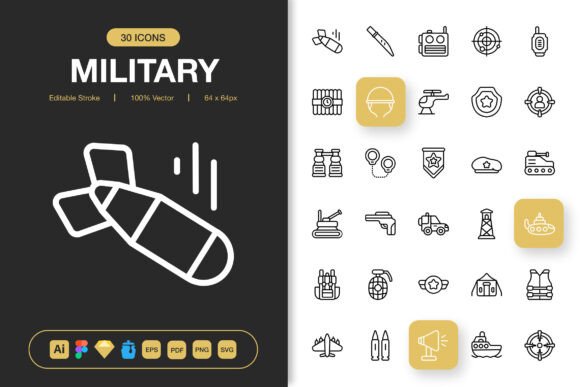
At its core, this pack includes a wide range of symbols tied to military, tactical, and defense contexts. Think helmets, ranks, badges, weaponry, vehicles, communication devices, maps, and insignia. But the real value lies in how they're built. Each icon uses editable strokes, meaning you can treat the line style the same way you'd adjust text styling in a document. Thin out a line for a sleek mobile header, or thicken it for a bold printed banner. That flexibility saves you from hunting down separate versions of the same symbol.
The pack arrives with source files that cover the major design ecosystems. You get Adobe Illustrator files, a Figma file, an Iconjar file for organized browsing, a Sketch file, plus EPS, PDF, and SVG formats. There's also a comprehensive PNG export with transparency at sizes ranging from 32px up to 512px. That blend of vector precision and raster convenience means you won't waste time converting files when you need a quick icon for a slide deck or a high-resolution asset for a trade show backdrop.
Adding Visual Structure to Presentations and Reports
Corporate and government presentations often suffer from text overload. When you're explaining logistics, chain of command, risk assessment, or operational timelines, a few well-placed icons can guide the viewer's eye faster than another paragraph of bullet points. Military icons work especially well in sectors like defense contracting, private security, emergency management, and geopolitical analysis. A simple helmet icon next to a personnel overview slide, or a radar symbol on a threat assessment report, signals the topic instantly.
Because the pack uses a consistent stroke style, you avoid the visual clutter that comes from mixing icons from different sources. All the symbols feel like they belong to the same family. That coherence is subtle but powerful in presentations where every slide should look intentional rather than assembled from odds and ends.
Streamlining Mobile App and Game Interface Design
Developers and UI designers building strategy games, military simulators, or fitness apps with a tactical angle often face a specific problem. They need recognizable, visually lightweight icons that don't overwhelm small screens. A heavy, overly detailed icon might look fine on a desktop monitor but turn into an unreadable blob on a phone. The minimalist approach in this pack solves that. Simple outlines and clear shapes hold their integrity even at smaller sizes like 32px or 48px, making them ideal for navigation bars, button labels, inventory screens, and map markers.
Drag-and-drop compatibility across Figma, Sketch, and Illustrator means the design team can pull assets directly into existing component libraries. If the game requires a custom color palette to match a sci-fi or historical theme, editable strokes let you recolor everything in a few clicks instead of exporting and re-importing assets repeatedly.
Enriching Educational and Training Materials
Educators, military historians, and training coordinators often build course materials, handouts, and e-learning modules where visual cues improve retention. A module on NATO military structure, for example, benefits from icons that visually differentiate land, air, and naval units. A cadet training manual feels more intuitive when specific sections carry a consistent icon set rather than generic clip art.
Because the icons are vector-based and scalable, you can enlarge them for poster-sized classroom visuals without any pixelation. Print instructors sheets, laminate drill procedure cards, or project clean diagrams onto a screen with the same source file. The PDF and EPS formats ensure print shops won't come back asking for a "higher resolution version."
Strengthening Social Media and Content Marketing Graphics
Bloggers, video creators, and social media managers covering topics like defense news, survival tactics, historical analysis, or even paintball and airsoft communities can use military icons to create crisp thumbnails and post graphics. A YouTube video exploring modern infantry equipment feels more authoritative when the thumbnail uses a clean, professional-grade icon rather than a muddy stock image. Infographics benefit from icon-driven data points that replace heavy text blocks with scannable visual markers.
The PNG transparency files at multiple sizes are particularly useful here. You can grab a properly sized icon for Instagram, Twitter, or a blog header without cracking open a full design suite. Yet when you need to build a more elaborate graphic, the vector source files are ready and waiting.
Designing Merchandise, Apparel, and Promotional Goods
Small business owners running print-on-demand stores, veteran-owned merchandise brands, or custom apparel shops often need military-inspired graphics that look understated rather than cartoonish. Stickers, patches, t-shirts, and mugs with clean iconography sell better than overly complex designs that don't translate well to fabric or curved surfaces. The minimalist line style here adapts to embroidery, screen printing, and laser engraving with fewer production headaches.
The editable stroke feature becomes especially practical in this context. You can reduce line thickness to create a subtle, premium look on a black t-shirt, or increase it for a bold, high-contrast patch design. Since you control the vectors, you're not stuck with someone else's creative decisions about stroke weight or corner style.
How Different People Benefit in Different Ways
Freelance designers gain a reliable asset library that cuts down on per-project icon hunting. A single purchase provides military-specific icons they can reuse across client work without worrying about licensing gaps. For someone juggling a branding project in the morning and a mobile UI mockup in the afternoon, format variety is a genuine time-saver.
Content creators and bloggers get access to visual shorthand that clarifies their topics. When you write about military strategy, defense technology, or survival preparedness, readers scan your article before they commit to reading it. Icons placed near section headers or within infographics give them a reason to slow down and engage. The readme file included in the pack helps less technically inclined users locate the right format without frustration.
Marketing teams in defense-adjacent industries often operate with tight turnaround times and strict branding guidelines. Having a premade icon set that matches a professional aesthetic means they can build campaign assets, landing pages, and trade show collateral without starting from scratch or waiting on custom illustrations. The drag-and-drop nature of files organized in Iconjar further streamlines the workflow for non-designers on the team who need to assemble quick visuals.
What to Consider Before Adding This Pack to Your Toolkit
Think about your actual project needs before downloading any large icon collection. A military-specific theme works beautifully for certain niches but won't serve as a general-purpose icon library. If your work spans widely different subjects, pair this pack with complementary sets that fill the gaps. Also consider the file formats you actually use. If your entire workflow lives in Figma and you never touch Illustrator, make sure the Figma file structure matches how you organize components. The good news here is that multiple format options reduce that risk.
Color customization is straightforward with editable strokes, but if your project requires solid fill icons with complex gradients, you'll need to adapt the assets or use them as a starting point for further design work. The readme file usually includes guidance on file organization and any specific notes about layer structure, nudging you toward better outcomes.
One subtle yet significant factor is visual continuity. If you're already using another icon family in a product or brand, test a few of these military icons against your current set. Consistency in stroke width, roundness, and overall density ties a project together more than most people consciously realize. The pack's clean, minimalist identity helps, but a quick side-by-side comparison with your existing assets will confirm whether they mesh well.
The Practical Difference of Clean, Customizable Icons
When you strip away the marketing language, the real benefit of a focused icon pack is simple. You spend less time searching, resizing, and fixing mismatched graphics, and more time making your project look cohesive. The Military Icon Pack covers the spectrum from quick social media assets to full-scale print production, and the editable stroke capability puts control in your hands rather than locking you into a preset style.
People notice when design elements feel intentional. A well-chosen icon set communicates effort and attention to detail, whether on a mobile screen, a printed flyer, or a presentation slide projected across a conference room. That perception shapes how viewers, clients, and customers respond to your work long before they engage with the actual content. By selecting assets built for flexibility, you're investing in a smoother creative process and a more polished final product.