Mother Earth Day Icons for Every Creative Project
Visual language shapes how people connect with environmental messages. A well-designed icon can say more in a few pixels than paragraphs of text, especially when the subject is as urgent and universal as caring for our planet. This collection of Mother Earth Day Icons brings together clarity, symbolism, and professional polish in a set built to work across screens, paper, and everything in between. Whether you are designing a sustainability report, building a mobile app, or creating classroom materials for young learners, these icons give you a reliable foundation.
What makes this particular set stand out is not just the theme but the practical thinking behind the files. The package includes source files for Adobe Illustrator, Figma, Sketch, and Iconjar, alongside EPS, PDF, SVG, and multiple PNG sizes. That means you are not locked into a single workflow or forced to convert formats before you even begin. For anyone who has wasted time wrestling with incompatible assets, that immediate compatibility feels like a quiet gift.
What Is Included in the Icon Set
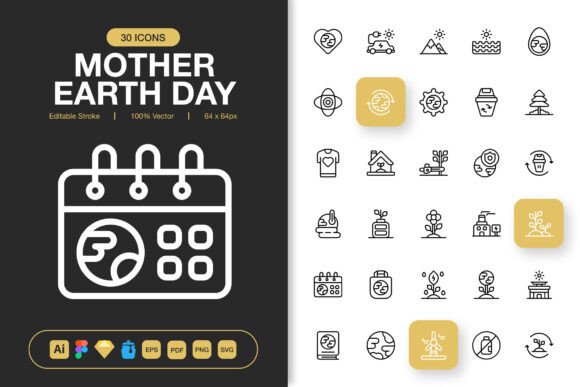
At its core, this collection delivers a range of earth-themed icons with an editable stroke style. The minimalist approach keeps shapes clean and legible at any size, which matters when you are placing a tiny icon in a mobile footer or blowing one up for a poster. Each icon arrives in a variety of formats so you can drag and drop them into your project without extra steps. The PNG files come in sizes from 32px to 512px, giving you both tiny UI elements and large-format graphics without resampling artifacts. The SVG and PDF versions preserve vector sharpness when you need to scale further or print at high resolution.
Alongside the graphic files, a Readme document explains the structure and licensing, removing guesswork for those who want to know exactly what they can and cannot do with the assets. This transparency matters for agencies, publishers, and freelancers who handle commercial work and need clear usage rights from the start.
Editable Strokes and Full Customizability
One detail that experienced designers will immediately appreciate is the editable stroke feature. Instead of flattened shapes that resist modification, these icons let you adjust line weight, change stroke color, or replace fill styles to match your brand palette. A minimal line icon can become a bolder filled version without redrawing from scratch. This flexibility also helps educators and content creators who may want to recolor icons for different age groups or presentation themes while keeping visual consistency across materials.
The claim of 100% customization is not just marketing language. Because the source files use layers and editable paths, you can isolate individual elements, combine icons, or simplify details for very small displays. That control turns a prefabricated asset into a genuine building block for your own creative vision.
Why Different Audiences Care About Icon Choices
People come to an icon set with very different needs, and a collection like this must serve many of them simultaneously. A freelance social media manager, a high school science teacher, a startup founder, and a print shop owner may all download the same files for completely different reasons. Recognizing those varied perspectives helps you decide whether this set fits your specific situation.
Marketers, Bloggers, and Social Media Creators
Speed and visual punch drive content creation for these users. When you are queuing up Instagram stories, newsletter graphics, or blog headers, you need icons that look polished without hours of editing. The drag-and-drop simplicity of PNG files sized from 32px to 512px lets you quickly assemble graphics that feel cohesive. A blogger writing about sustainable living might scatter small leaf and globe icons through a long-form article, while a marketer promoting an Earth Day campaign can build a unified visual theme using the same icon family across Facebook, email, and landing pages.
For this group, ease of use and presentation quality dominate the decision. They rarely need to edit paths or change strokes, but they do need assets that look professional on high-resolution phone screens and retina displays. The PNG transparency support means icons layer cleanly over photographs and colored backgrounds without white boxes ruining the composition.
UX Designers, App Developers, and Web Creators
For digital product teams, icons are functional elements before they are decorative. A leaf icon in a navigation bar or a recycling symbol on a settings page must read clearly at 32px on an older phone. The vector formats in this set, especially SVG and the Figma-compatible files, integrate directly into component libraries and design systems. An editable stroke property becomes essential when you need to maintain consistent line widths with the rest of your interface.
Developers will appreciate having SVG files with clean markup they can animate, style through CSS, or inline directly into HTML without running optimization scripts first. The Iconjar file format also streamlines workflows for Mac-based designers who organize icon libraries across projects. Here, flexibility and long-term usefulness outweigh initial visual appeal because these icons may live inside a product for years.
Print Designers, Publishers, and Event Organizers
High-resolution output changes the conversation. A flyer promoting a community tree-planting event or a poster for a school sustainability fair demands crisp edges at sizes that digital screens never reach. The EPS and PDF files in this set handle that scaling gracefully, and the 512px PNG versions work well when placing imagery into InDesign or Canva layouts without linking external vector files.
Organizers producing banners, tickets, booklets, and signage benefit from a unified icon style that ties all materials together. Because the icons share consistent proportions and stroke treatments, they look like a family rather than a random assortment. Print reliability and visual cohesion become the top priorities for this audience.
Educators, Nonprofit Workers, and Community Volunteers
These users often operate with limited budgets and mixed technical skills. They need assets that work immediately in the tools they already know: PowerPoint, Google Slides, Canva, or simple word processors. The wide range of PNG sizes means they can insert icons without learning vector software, and the transparent background ensures the icons sit cleanly on handouts, certificates, or activity sheets.
A teacher building a lesson about climate change might use globe icons as visual anchors in a slideshow, then print matching cutouts for a classroom display. A nonprofit coordinator could repurpose the same icon set across social media posts, donor reports, and event signage, creating a consistent identity without hiring a designer. For them, accessibility and readiness define the value of the collection.
Small Business Owners, Freelancers, and Entrepreneurs
Branding on a budget often means making smart asset purchases that stretch across multiple uses. A small business selling eco-friendly products could use these Mother Earth Day Icons on packaging labels, Etsy listings, website badges, and loyalty cards. The editable stroke customization lets them match the icons to brand colors, changing what starts as black outlines into soft greens, earthy browns, or vibrant teals that align with their visual identity.
Freelance designers offering services to multiple clients find value in a well-organized icon set that they can legally use in commercial projects without per-client licensing headaches. The Readme file clarifies usage, and the inclusion of editable source files for Illustrator, Figma, and Sketch means the assets fit into whichever design environment a client prefers.
How Beginners and Experienced Users Approach the Same Set
Your skill level shapes what you notice in an icon collection. Beginners often look first at the PNG folder, grab a size that fits their screen, and drop it into Canva or a Google Doc. They might not open the Illustrator or Figma files for months, if ever. What matters to them is that the icons look good right away and do not require technical tweaking.
Experienced designers tend to open the vector source files immediately. They check layer organization, path cleanliness, and whether stroke widths are consistent or require adjustment. They might import the SVG files into a design system and run accessibility checks for contrast and legibility. These users value the editable stroke feature not because they want to change everything but because they need the option to adapt icons to strict design standards.
Both groups can be satisfied by the same collection when it respects those different entry points. Providing multiple file formats and clear documentation without forcing users into one workflow is what bridges the gap between casual creators and seasoned professionals.
Practical Scenarios for Mother Earth Day Icons
Let us look at concrete examples where this specific icon set makes a noticeable difference. These scenarios span industries and skill levels, showing how the same assets solve different problems depending on context.
- An influencer preparing an Instagram carousel about zero-waste living uses the 128px PNG icons as bullet-point replacements, each trash bin or sprout icon reinforcing a tip without adding visual clutter.
- A textbook publisher licenses the vector files to create consistent chapter-opening illustrations about ecosystems, editing stroke colors to match the book's two-color printing palette.
- A city council's sustainability office builds a public dashboard showing recycling rates, populating the UI with small 32px SVG icons that animate on hover to show data changes.
- A wedding planner designing an eco-conscious event suite uses the leaf and earth icons on invitations, menus, and thank-you cards, adjusting line weights to feel delicate and elegant.
- A hobbyist making a family cookbook adds icons next to vegetarian, seasonal, and locally sourced recipes, using the PNG transparency to layer over recipe photos.
In every case, the core asset set remains the same, but the use case shifts dramatically. That versatility is what makes a thoughtfully organized icon collection valuable across months and years rather than for a single project.
What to Look for When Evaluating an Icon Set
If you are deciding whether these Mother Earth Day Icons fit your needs, consider a few practical questions. Does the file list include formats your current tools can open without conversion? Are the sizes adequate for both digital screens and printed materials? Can you modify the icons without specialized plugins or expensive software add-ons? Do the Readme and source files suggest the creator thought about real-world usage or just assembled assets for a quick sale?
The inclusion of Iconjar, Sketch, Figma, and Adobe Illustrator files points toward a set built for professional workflows. The seven PNG sizes anticipate common UI and print dimensions. The editable stroke design acknowledges that one brand's thin elegant lines are another brand's too-fragile weight. These details matter when you are mid-project and cannot afford to pause while you search for a workaround.
Long-Term Value and Reusability
Icons with a seasonal theme like Earth Day might feel narrow at first glance, but environmental topics cycle through calendars every year. Sustainability reports, school curricula, nonprofit campaigns, and green business promotions are not limited to April. Having a dependable set of earth-themed icons means you are ready whenever a project with environmental messaging appears, without scrambling to license new assets or compromise with mismatched free downloads.
The editable stroke and customizable color options further extend the set's lifespan because you can refresh the look without buying new icons. A color palette change can make the same icon feel modern two or three years later, and the vector source files ensure you never have to start from scratch just because your design tool stack shifted.
For teams and individuals who care about both creative quality and practical efficiency, an icon set that arrives organized, documented, and ready to use in multiple environments saves more than time. It preserves creative momentum, which is often the most fragile resource in any project. When you can grab an icon, place it, tweak it if needed, and move on to the next task, you maintain the flow that leads to better work across the board.