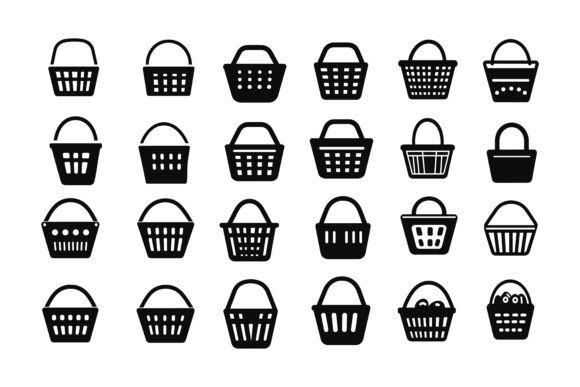
Wicker Basket Icons Set
There’s something instantly grounding about woven textures—they remind us of farmers’ markets, sun-drenched porches, and hands that have shaped natural materials into useful everyday objects. The Wicker Basket Icons Set captures exactly that feeling and translates it into a clean, versatile digital package you can use in hundreds of different projects. Whether you’re designing a logo for a small-batch bakery, sprucing up a blog’s recipe cards, or building an app that helps people organize local artisan goods, these icons bring an organic warmth that flat, generic graphics often miss.
What makes this particular collection stand out is its thoughtful construction. You’re not just downloading a random jumble of basket shapes. The set arrives as a neatly organized AI and EPS file, with every layer named and grouped sensibly. For anyone who’s ever wasted an afternoon hunting through a disorganized design file, that structure alone is a stress reliever. You also get high-resolution JPG previews, so you can quickly share mockups with clients or drop a concept straight into a presentation without opening Illustrator.
Where Woven Texture Meets Modern Visual Needs
Icons like these aren’t limited to obvious picnic or rustic themes. Because they’re delivered as fully editable vector illustrations, you can push them in directions that suit your project’s tone. A nutrition coach might use a sleek, darkened basket silhouette to symbolize weekly meal prep containers. A wedding planner could incorporate delicate, pastel-tinted wicker icons into invitation suites or digital seating charts. The same set that helps a garden center advertise hanging baskets can also become part of a minimalist app interface for a zero-waste grocery delivery service.
When you can modify every path, stroke, and color with ease, the icon stops being someone else’s design and starts becoming a building block for your own visual language. Need the weave pattern to match a specific brand’s honey-gold palette? A few clicks in Adobe Illustrator and the icon adopts that exact shade, keeping your entire asset library visually cohesive.
Real-World Projects That Benefit from Basket Icons
Let’s step away from theory and look at how different people actually put these icons to work. Each scenario below comes from real design challenges freelancers, small teams, and content creators face every week.
- Farm-to-table restaurant branding — A menu, signage, and social media templates all need a consistent earthy motif. The wicker icon can anchor the logo, mark special menu items, and serve as a subtle background element on Instagram posts.
- Handmade goods e-commerce — Product tags, packaging stamps, and website category icons for candles, soaps, or woven baskets themselves. The editable vectors let you scale them down to a tiny 32-pixel icon or blow them up for a hang tag without any quality loss.
- Educational printables and classroom decor — Teachers creating reading logs, nature study sheets, or classroom labels often look for approachable imagery. A lined basket icon becomes a “book return” symbol, while a round basket can mark a “sharing circle” activity.
- Infographics about sustainability or local food systems — A clean wicker icon set can represent harvest, storage, or community-supported agriculture data points. The consistent line weight across all icons keeps the infographic looking polished.
- Mobile apps for organizing or lifestyle planning — Whether it’s a closet organizer app that uses woven basket icons for “stored items” or a meal planning tool where a basket indicates “fresh ingredients,” the visuals feel intuitive and gentle on the eyes.
Why an AI and EPS Format Actually Solves Your Workflow Problems
If you’ve only worked with raster images before, vector files might seem like a designer-only tool. But the flexibility they offer has real, everyday benefits that even casual users appreciate once they give it a try. The Wicker Basket Icons Set comes in both AI (Adobe Illustrator) and EPS formats—industry standards that give you complete control.
Let’s say you run a small candle business and you want to use one of the basket icons on your thank-you cards. The original icon is a warm tan, but your packaging uses a deep forest green. With the vector file, you simply select the shape and apply your hex code. Done. No awkward color mismatches, no weird white edges around a cut-out JPG. And because the file structure is clean—layers labeled, groupings logical—you won’t need to ungroup a hundred random elements to isolate the part you want to recolor.
For Windows and Mac users alike, the compatibility is seamless. Whether you’re on a Surface tablet tweaking icons for a church bulletin or on a MacBook polishing a pitch deck for a farmers’ market booth, the files open perfectly in any modern vector editing software, including free alternatives like Inkscape.
Customization That Matches Your Specific Needs
One of the quiet frustrations of using stock graphics is when you find something almost perfect. The style is right, but the color is wrong. Or the icon has a handle you don’t need. Because this collection is built with perfection in details and consistency, you aren’t forced to accept design compromises. You can remove a handle with two anchor point adjustments. You can make the weave pattern thicker or thinner. You can even combine elements from different icons to create an entirely new symbol that still looks like it belongs in the set.
This level of control means the icons work for widely different audiences. A blogger who writes about mindful living might keep the soft, natural appearance and use the icons to break up long text posts. A corporate social responsibility report could use the same icons but rendered in a crisp navy and charcoal palette to align with a more formal brand guide. The consistency across the set—uniform line weights, matching level of detail—makes these adaptations feel intentional rather than patched together.
Print and Digital: One Investment, Two Worlds
Many design assets shine on screen but crumble when you send them to a printer. A low-resolution JPG that looks fine on a website becomes a pixelated mess on a flyer. The Wicker Basket Icons Set sidesteps that entirely. Because the vectors are resolution-independent, you can use them for a 12-foot trade show banner and a tiny app icon on the same afternoon. Small businesses that print product inserts, window decals, or tote bags will immediately notice the sharpness advantage.
On the digital side, the included JPG files serve as a handy shortcut. You can place them directly into a Canva project, a Google Slides presentation, or a Squarespace website if you’re in a hurry. But having the AI and EPS files in your back pocket means you’ll never get stuck when a project suddenly demands a larger size or a transparent background instead of a white box.
Integrating Icons into Symbols, Apps, and Infographics
Developers and UX designers will find these icons particularly useful for app onboarding screens, tab bars, or feature highlights. A symbol set that already has a consistent visual language saves the team from having to dream up thirty variations of the same concept. The neatly organized layer structure makes it straightforward to export individual SVGs for web use, and the consistent line style keeps the interface feeling intentional.
For infographic creators—whether you’re a marketing professional illustrating survey data or a teacher making a visual guide to composting—these wicker basket icons provide a thematic anchor. Instead of generic boxes, you can use woven containers to represent categories like “food waste,” “recyclables,” or “community donations,” making dry numbers feel more human and relatable.
What to Keep in Mind Before You Start Using the Set
Even the most well-crafted asset is only as powerful as the plan behind it. Before you download and begin dropping icons into every project, consider these practical points:
- Brand consistency first. The icons are highly editable, which is wonderful, but editing them to match your color palette, line weight, and overall vibe should be one of your first steps. Set aside twenty minutes to create a master set in your brand’s style, then pull from that instead of editing on the fly.
- Check your editing tool’s version. While AI and EPS files are widely supported, older software versions or non-Adobe apps might occasionally misinterpret complex layer groups. Test one icon before diving too deep into a project.
- License understanding. Clarify what the commercial license allows—whether you can use the icons in a logo sold to a client or in a merchandise design. Most creators of such collections provide clear terms, and knowing them upfront prevents headaches later.
- Don’t over-weave. Because the basket texture is attractive, it’s tempting to overuse it. Treat the icon like a spice: a little adds warmth, too much overwhelms the dish. Use it strategically to highlight key information or to create visual breaks.
Making the Set Your Own with Simple Edits
Imagine you’re designing a weekend event flyer for a community swap meet. You open the AI file, select the rounded basket icon that caught your eye, and change its fill from tan to a cheerful orange that matches your event theme. Then you duplicate the icon, remove the contents, and use the empty basket with a subtle dashed line to indicate “bring your items here.” Within ten minutes, you’ve created two cohesive, on-brand symbols that look custom-made.
That’s the real value of an illustration set designed with edit freedom in mind. It doesn’t lock you into the designer’s original vision; it hands you the raw materials and lets you shape them around the project that’s sitting on your desk right now. Whether you’re a freelancer juggling five client identities, a content creator refreshing your weekly newsletter template, or a small bakery owner designing a new coffee loyalty card, you’re getting a toolkit, not a finished painting.
Who Finds the Greatest Day-to-Day Value Here
While anyone can use the Wicker Basket Icons Set, certain user types keep coming back to assets like this because it solves recurring problems in their workflow. Entrepreneurs running multiple seasonal promotions can quickly adapt the icons for summer picnic themes and autumn harvest themes without hunting for new graphics. Educators who create monthly activity sheets love having a consistent set of related icons that students recognize from September through May. Nonprofit communicators who need to explain food distribution or clothing drives in annual reports appreciate the instantly recognizable shape language that transcends complex English descriptions.
And then there are the hobbyists—the person who makes custom greeting cards on weekends, the parent who designs vibrant bake sale posters, the community garden coordinator who puts together a simple welcome pamphlet. For them, the combination of approachable subject matter and easy customization removes the intimidation factor that sometimes comes with professional design tools. You don’t need to be a pro to make something that looks professional.
Ready to Bring That Warmth into Your Work?
The best creative assets don’t just sit in a folder—they become part of your regular toolkit, the thing you reach for when a project needs a dose of the familiar and the handmade. The Wicker Basket Icons Set offers precisely that: a versatile, carefully constructed, easily editable collection that respects your time and your vision. So what are you waiting for? Buy now and start using this awesome illustration to add a genuine, woven touch to your next design.
From the first double-click to the final export, you’ll notice how the thoughtful layer structure, cross-platform compatibility, and attention to detail keep you in a creative flow. No more wrestling with messy files or settling for icons that almost fit. You have everything you need to make every symbol, screen, and printed piece feel right.