Evaluating Digital Painting Icons for Your Creative Toolkit
Choosing the right icon set can quietly shape the visual success of a project. Among the many options available today, Digital Painting Icons has emerged as a collection worth examining. It offers a curated range of high-quality icons built around creative tools, art supplies, and digital illustration themes. What makes this particular set interesting is not just the subject matter, but the thoughtful way it balances aesthetic clarity with practical flexibility. Whether you are designing a mobile app for artists, laying out a tutorial website, or preparing print materials for a workshop, the icons you select influence readability, mood, and user experience. This article explores the strengths, tradeoffs, and realistic use cases for this icon set, helping you decide if it aligns with your next project.
What the Digital Painting Icons Set Actually Includes
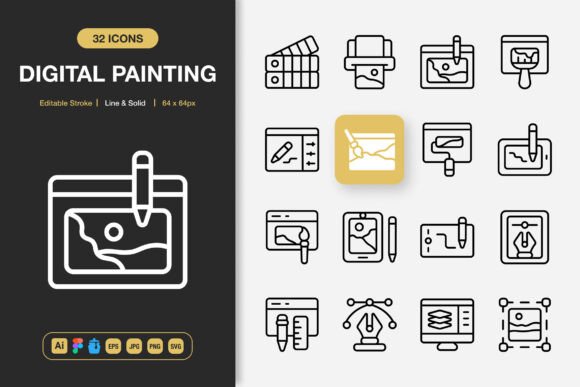
At its core, Digital Painting Icons is a comprehensive collection of vector-based graphics centered on art and design themes. The set covers everything from stylus pens, brushes, and color palettes to canvas tools, layers, and creative software symbols. It is delivered across multiple file formats, which immediately signals a commitment to cross-platform compatibility. Users receive source files for Adobe Illustrator, a dedicated Figma file, an Iconjar file for streamlined organization, EPS version 10, JPG, SVG, and transparent PNGs. A readme file accompanies the package, offering basic guidance. This level of format coverage means the icons can be used in web development, mobile app interfaces, print design, social media graphics, infographics, flyers, banners, and posters without major conversion headaches.
The set includes both line and solid styles, which is a meaningful distinction. Line icons tend to feel airy, modern, and subtle, while solid icons carry more visual weight and work well in confined spaces. Having both options within a single collection reduces the need to source matching icons from multiple places. The editable stroke feature allows designers to adjust line thickness, which is particularly useful when adapting icons to different grid sizes or brand guidelines. The icons are described as fully customizable, meaning colors, shapes, and sizes can be modified without losing quality. This flexibility is supported by the vector nature of the source files, ensuring crisp rendering at any scale.
Why Designers and Content Creators Take Interest
There is a practical reason why icon sets like this attract attention. Creative professionals, educators, and content producers often need visual shorthand for complex tools and actions. Icons representing a graphics tablet, a paint bucket, or a layer stack communicate meaning faster than words alone. For anyone building a platform that teaches digital art, sells art supplies, or showcases a portfolio, visually consistent icons reinforce brand identity and improve navigation. The Digital Painting Icons set becomes appealing because it is purpose-built for these contexts, rather than being a generic collection stretched to fit.
Another factor is time efficiency. Sourcing individual icons, verifying licenses, and ensuring visual consistency across a project can be surprisingly time-consuming. A well-organized set that offers drag-and-drop simplicity reduces friction in the design workflow. This is especially valuable for solo designers, small teams, and content creators who juggle multiple responsibilities. The inclusion of an Iconjar file further speeds up the process, as Iconjar allows for quick searching and importing without digging through folders.
Key Strengths and Practical Benefits
One of the most significant advantages of this icon collection is its cohesive visual language. When icons share consistent stroke weights, corner radii, and proportional scaling, the overall interface or layout feels intentional rather than cobbled together. This professional coherence matters in client presentations, product launches, and public-facing materials. The availability of both line and solid styles within the same family means you can create visual hierarchy by switching styles between primary and secondary navigation, for example.
The editable stroke feature is particularly relevant for responsive design. A website viewed on a large monitor may benefit from thinner, more elegant strokes, while a mobile screen demands slightly thicker lines for legibility. Instead of searching for an entirely different icon set, designers can adjust the existing files. Similarly, the customizable color palette means the icons can shift to match brand colors, seasonal campaigns, or dark mode requirements without extra illustration work.
File variety is another practical strength. Having access to AI and EPS files supports print designers who need to scale artwork for large banners or posters. Figma files cater directly to UI and UX teams that rely on collaborative design tools. SVG and PNG formats serve web developers who need lightweight, scalable assets or fixed-size bitmap images. The transparent PNGs are ready to use in social media posts, video overlays, and e-book layouts without background removal. This multi-format approach respects the reality that modern projects rarely live in a single software ecosystem.
Honest Tradeoffs and Considerations
No icon set is universally perfect, and Digital Painting Icons comes with its own set of considerations. The niche focus on art and design tools is a double-edged sword. If your project revolves around finance, healthcare, or logistics, the thematic relevance drops sharply. You might still use a few icons, but the collection would not serve as a primary resource. It is important to evaluate whether the majority of icons align with your actual content needs rather than being drawn in by the aesthetic quality alone.
Customizability, while generally positive, also implies a certain level of editing skill. Users who lack experience with vector editing software might find the editable stroke and color adjustments less accessible. Although drag-and-drop PNGs solve immediate needs, unlocking the full potential of the set requires comfort with tools like Adobe Illustrator or Figma. Beginners should factor in a learning curve if they plan to heavily modify the icons.
Another aspect to consider is the scope of the collection. While the set is described as high-quality and comprehensive, users with very specific or obscure tool requirements might find gaps. For instance, if you need icons for a highly specialized piece of equipment or a niche software feature, you may need to supplement with custom illustrations or another set. Checking the included icon list before purchasing is a practical step that can prevent disappointment later.
Ideal Project Matches for This Icon Collection
Certain project types stand out as particularly well-suited for Digital Painting Icons. Educational platforms that teach drawing, painting, graphic design, or 3D modeling can use these icons to visually organize lessons, mark progress, and label tool categories. Mobile apps aimed at artists and illustrators benefit from interface icons that mirror the tools users already recognize, reducing cognitive load. Portfolio websites for creative professionals gain a subtle but polished touch when iconography matches the artistic nature of the work displayed.
Print materials such as workshop flyers, event banners, and instructional booklets also present a strong fit. The vector-based source files ensure that scaling for large formats does not degrade quality. Infographics that explain creative processes or artistic workflows become more engaging when supported by relevant visual cues rather than generic shapes. Social media managers in creative niches can use the transparent PNGs to build consistent, branded content quickly.
For teams that rely on Figma for collaboration, the included Figma file is a significant practical benefit. It allows multiple designers to access, use, and modify the icons within an established design system. This collaborative readiness can speed up prototyping and handoff stages considerably. The Iconjar file offers similar efficiency for Mac users who prefer organized icon management.
When Alternatives Might Serve You Better
If your project demands icons with a completely different thematic focus, such as corporate services, nature, or technology hardware, then a dedicated set in those categories would be a better investment. There is little sense in purchasing an art-focused icon set when only a fraction of the icons will ever see use. General-purpose icon libraries with broader coverage might offer more flexibility for multi-topic projects, even if they lack the specialized charm of a niche set.
Budget-conscious beginners who only need a handful of icons might find that free icon resources meet their immediate needs without added cost. While free sets often lack the depth, file variety, and consistent quality of a premium collection, they can serve as a starting point. On the other end, large established design systems, such as those provided by major software companies, offer extensive icon libraries with extensive documentation and community support. These can be preferable for enterprise-level applications where standardization and long-term maintenance are key concerns.
Accessibility considerations also come into play. Highly detailed or thin-stroke icons can pose readability challenges for users with visual impairments. If your project prioritizes maximum accessibility, you may need to evaluate icon thickness, contrast ratios, and touch target sizes carefully. Some icon sets are specifically designed with accessibility standards in mind, and these might be worth exploring as an alternative or supplement.
Making a Decision That Aligns With Your Goals
Evaluating Digital Painting Icons ultimately comes down to three main questions. First, does the artistic theme match the visual identity and content of your project? Second, do you value having multiple file formats, editable strokes, and both line and solid styles in one cohesive package? Third, are you comfortable with vector editing tools to fully leverage the customizable features? If these conditions are met, the set offers a practical, high-quality resource that can streamline design work across websites, mobile apps, print materials, and beyond.
For those still uncertain, a helpful approach is to map out the specific icons your project needs and compare them against the collection's contents. This simple exercise often clarifies whether the set represents a worthwhile investment or a partial mismatch. Remember that icon sets are not just decorative elements; they are functional components that guide users, communicate meaning, and shape the emotional tone of a design. Choosing thoughtfully pays dividends in both user experience and brand perception.
The Digital Painting Icons collection stands as a solid, well-structured option for creative projects rooted in art, design, and illustration themes. Its strengths lie in visual consistency, format variety, and customization potential. The main limitations involve thematic specificity and the need for some editing proficiency. By weighing these factors honestly against your project requirements, you can make a confident decision that supports both your creative vision and practical workflow needs.